


Pill Identifier & Drug Search
3.7563.00 Reviews
App Specs
- Version
- 5.2.4
- Updated On
- License
- Free
- Downloads
- 100,000+
- Developer
- FriendsApp Listing
- Categories
- Medical
- Platform
- Android
Screenshots
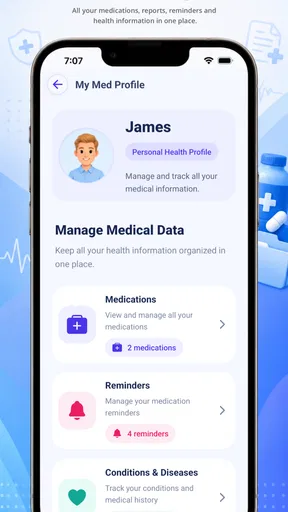
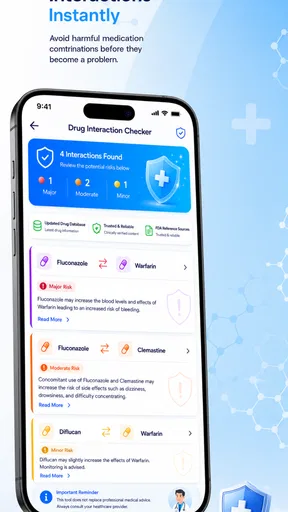
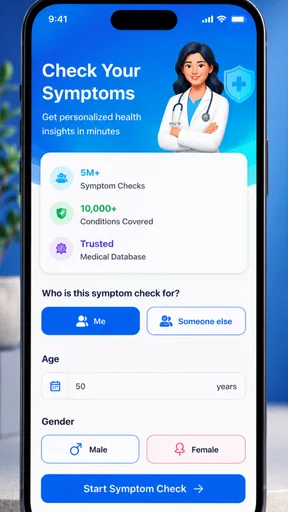
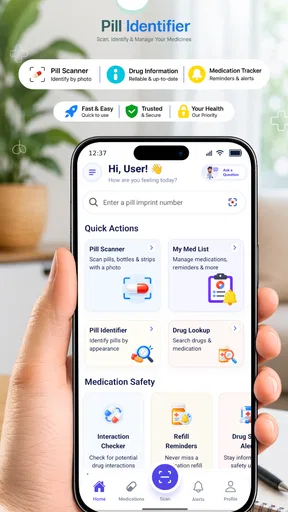
 Analysis by AppCompare
I approached Pill Identifier & Drug Search as a practical medical reference rather than something meant to replace a pharmacist or doctor. Its main purpose is straightforward: help you identify a pill, look up a drug, and read related medication information from a phone. That focus makes sense for moments when a package is misplaced, a tablet is unfamiliar, or a medicine name needs checking quickly.
My overall impression is that the app is most useful when I treat it as a first reference point. It can help organize a question before I speak with a healthcare professional, but I would not use a search result alone to decide whether to take, stop, combine, or change a medicine. The app is free, aimed at Everyone, and comes from FriendsApp Listing. Its medical category is clear, and its reach—over 100 thousand installs—suggests that it has found an audience beyond occasional curiosity.
The current release is version 5.2.4, while the app itself dates back to January 25, 2019. That combination matters to me: it is not a brand-new experiment, but medication information still needs careful checking because names, formulations, warnings, and regional availability can differ. I found the experience easier to judge when I focused on how well it supports a person under pressure, including someone with limited vision, reduced dexterity, attention difficulties, or poor internet access.
How the app supports different people and situations
I find this section important because the same pill-search task can feel very different depending on someone’s eyesight, dexterity, reading comfort, or whether a caregiver is nearby. I’d treat accessibility as part of the checking process, not a bonus: the easier it is to enter details carefully and review a possible match, the less likely a rushed guess becomes. That leads naturally to the practical situations where the app can be most helpful.
Readability and navigation come first
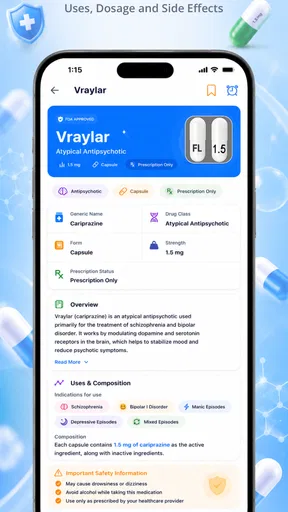
The strongest part of this kind of tool is the directness of its purpose. A person usually opens it with a specific question, not to browse for entertainment. The useful path is therefore short: identify the tablet or search for a drug, then read the information that appears. That is much more approachable than searching the open web, where a common medicine name can lead to advertisements, forum posts, outdated pages, and results that are difficult to compare.
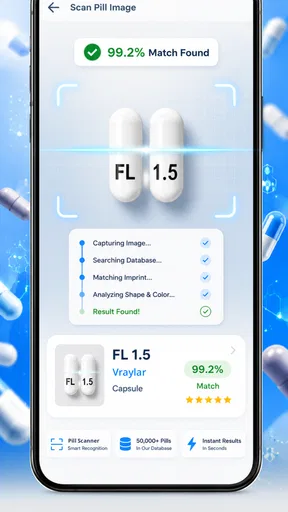
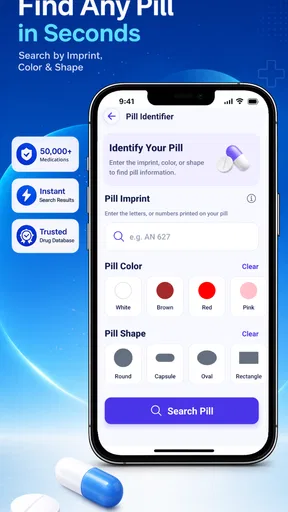
I also like the idea of separating visual identification from text search. Someone may know the name but not recognize the tablet, while another person may have the tablet in hand but no packaging. These are different problems, and an app built around both gives users more than one way to begin. In practice, I would start with the simplest route: type the medicine name if I have it, and use the pill details only when the label is missing or unclear.
The average rating is 3.7, based on around 1.3 thousand ratings, which feels consistent with a useful but not universally smooth reference tool. A rating in that range tells me not to expect the polish of a full pharmacy service. It also reinforces the need to check whether the result matches the tablet’s visible details, dosage, and packaging instead of accepting the first plausible match.
Worth Reading Before You Choose

EA SPORTS FC Mobile 26 Is a Bigger Football Game, but It Takes Time

Flipboard Shows What News Apps Must Do Beyond the Feed

Switching to Android Auto Means Rethinking Your Driving Routine

Google Calendar Makes a Crowded Week Easier to Manage

Ludo King Makes the Most of the Minutes Between Plans

Baby Panda World Brings Quick Play to Modern Phones, but Its Game Library Feels Busy
For readability, the most important habit is to slow down at the information page. Drug references often contain several types of content at once: uses, warnings, directions, side effects, and cautions. A user who has difficulty concentrating may benefit from reading one section at a time and writing down the exact question they still have. I would not rely on quickly scanning a long page, especially when the medicine is unfamiliar or the situation involves a child, an older adult, or several prescriptions.
People who use larger text or screen magnification may find a text-based search more manageable than trying to inspect a small tablet image. On the other hand, magnification can make a page require more scrolling, so it helps to keep track of the medicine name and the section being read. The app can support the search process, but the phone’s own display settings remain important for making the information comfortable to read.
Motor, visual, and sensory considerations
A pill identifier has an obvious advantage for users who cannot easily handle a physical reference book: the phone is portable, searchable, and already familiar to many people. Someone with limited hand strength can avoid turning pages and instead enter a name. Someone with low vision may be able to use the device’s built-in magnification, contrast, or spoken screen features, depending on the phone and personal settings.
There is also a trade-off. Identifying a pill visually can demand careful attention to small markings, shape, color, and sometimes the difference between similar tablets. That is difficult for a person with low vision, color-vision differences, tremors, or an unsteady camera hand. I would consider visual matching a clue, not proof. If the tablet is damaged, partly hidden, poorly lit, or separated from its original container, the safest next step is a pharmacist rather than repeated guesses inside the app.
Users with motor difficulties may prefer typing the name over manipulating a tablet for a photo or trying to align it for inspection. A voice-input keyboard could also reduce the effort of entering a long medicine name, although the accuracy of voice recognition should be checked carefully. Similar-sounding drug names are a real risk, so I would confirm every letter and compare the result with the package whenever possible.
For sensory-sensitive users, a focused medical tool is less distracting than a general search engine filled with unrelated material. Still, medication pages can contain dense wording and warning-heavy sections. I would use the app in a quiet place, increase the phone’s text size if needed, and avoid trying to interpret complicated information while driving, rushing, or dealing with a medical emergency.
People who depend on spoken output should listen critically. A screen reader may read the text, but it cannot decide whether a pill has been identified correctly or explain how two similar medicines differ in a particular person’s case. Spoken access improves reach; it does not turn the app into a personalized clinical adviser. That distinction is especially important when a user cannot easily inspect the screen independently.
Useful workflows beyond a quick name search
One practical workflow is to use the app before calling a pharmacy. I would note the tablet’s imprint, shape, color, and any information from the container, then search the closest matching name. Instead of asking a vague question such as “What is this pill?”, I could tell the pharmacist what the app found and ask them to confirm it. This saves time while keeping the final decision with a qualified professional.
A second useful approach is medication-list preparation. If I were helping a family member organize a doctor’s appointment, I could search each medicine separately and make a simple note of the exact name shown on the packaging. I would use the app to understand unfamiliar terms and prepare questions about purpose or common cautions, not to create a new dosing schedule. This is particularly helpful when a person has difficulty remembering why each medicine was prescribed.
A third insight is to use the search results comparatively, not just individually. If two products look or sound similar, I would open each entry and compare the names carefully before drawing any conclusion. Similar branding, different strengths, and extended-release versions can create dangerous confusion. The app is more valuable here as a way to expose the difference than as an authority that removes the need for checking.
Another sensible habit is to save nothing mentally that I cannot verify later. I would write down the medicine name and the question, then return to the original label or ask a professional. This matters because a person under stress may remember a partial name but forget whether the result referred to a particular strength or formulation. The app can reduce uncertainty, but it should not encourage false confidence.
Situational access: when a phone reference helps
The app makes the most sense at home, during travel, or while preparing for a healthcare visit. Imagine finding an unlabelled tablet in a weekly organizer after a relative has changed prescriptions. I would not give the tablet to anyone based on appearance alone. I would use the app to see whether the markings suggest a possible match, then contact a pharmacist with the tablet, its packaging history, and the search result. That workflow turns the app into a preparation aid rather than a risky shortcut.
It may also help when a person is comparing a prescription list with medicines already in a cabinet. A quick search can clarify unfamiliar names and make it easier to spot that two differently branded products may require professional confirmation before being used together. The important word is “clarify,” not “approve.” Medication decisions depend on health conditions, allergies, age, pregnancy, kidney or liver function, and other treatments—details a general identifier cannot safely infer from a pill alone.
For an older adult, the app could be useful when a caregiver is present and can enlarge the display, read information aloud, or enter the search accurately. That shared workflow is often better than expecting a person with poor vision or limited dexterity to identify a tablet alone. It also creates a natural checkpoint: the caregiver can compare the result with the bottle and call the pharmacy if anything conflicts.
For someone with reading difficulties or limited familiarity with medical vocabulary, the app may provide a starting point for questions. I would encourage the user to copy the medicine name exactly and ask a professional to explain unfamiliar instructions in plain language. The app can help reveal what needs explaining, but it may not make every technical term easy to understand.
Offline or weak-signal situations deserve caution. A phone-based reference is convenient, but I would not assume that every search or piece of information will be available without a connection. Before relying on it during travel, I would keep medication labels, prescriptions, and emergency contact details accessible as well. A screenshot or handwritten list can be a useful backup, but it should contain information checked against the original packaging.
Where the experience still creates barriers
The biggest barrier is the possibility of a confident-looking but incorrect match. Pills can share colors and shapes, markings can be hard to read, and a tablet may have been stored incorrectly. A search result is not the same as a verified identification. I would never use the app to settle an urgent poisoning concern, a suspected overdose, or a question about whether someone should take a medicine immediately. Those situations call for emergency or poison-control guidance.
Another limitation is the gap between general drug information and personal advice. A page may explain what a medicine is commonly used for, yet it cannot know why a particular clinician prescribed it or how it interacts with a person’s complete medical history. Users looking for individualized dosing, a diagnosis, or permission to stop treatment should choose a pharmacist or doctor instead.
Language and comprehension can also affect access. Medical wording may remain difficult even when the navigation is simple. A person with cognitive impairments may need a trusted helper to confirm the search and interpret the result. I would avoid handing the phone over with the expectation that the app alone will make a safe decision. The safest inclusive use often includes another person, the original label, and a clear question.
There is also a practical issue with screen interaction. A user with tremors, limited reach, or one-handed phone use may find repeated typing or visual inspection tiring. If a search fails, the app may become frustrating precisely when the user is already anxious. Preparing a medication list in advance is therefore more accessible than waiting until an unfamiliar tablet appears unexpectedly.
The app’s free price removes a financial obstacle, and its Everyone age rating makes it broadly approachable. That does not remove the need for adult supervision when a child is involved. A child may be able to open the app, but pill identification and medication decisions should remain with a responsible adult and a healthcare professional.
How it compares with familiar alternatives
Compared with a general web search, this app offers a more focused starting point. A search engine is better when I need official guidance from a particular health service, a manufacturer leaflet, or local emergency instructions. The app is better when I want to narrow a pill or drug question without sorting through unrelated pages. I would use both differently: the app for orientation, authoritative sources and professionals for confirmation.
Compared with a pharmacy consultation, the app is faster and available at any time, but it is much less personal. A pharmacist can inspect the actual tablet, review the container, ask about the person taking it, and explain what to do next. The app cannot replace those steps. Its best role is to make the conversation more precise and perhaps help a user realize that professional confirmation is needed.
Compared with a printed medication guide, the app is more portable and searchable. A paper leaflet may still be preferable for someone who dislikes screens, has unreliable phone access, or wants to keep instructions beside the medicine. Printed information also comes directly with a product in many cases, so I would give it priority for exact instructions about that specific prescription.
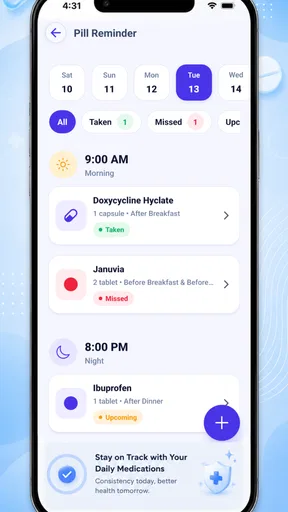
Compared with a full medication-management service, this tool appears narrower by design. Someone who needs reminders, refill coordination, interaction tracking, caregiver sharing, or a maintained personal medication record may be better served by a dedicated health platform or pharmacy service. I would not choose this app as my only tool for managing a complicated treatment plan.
My inclusive verdict
I see Pill Identifier & Drug Search as a useful first-stop reference for people who need to investigate an unfamiliar pill or drug name. Its free access, focused purpose, and broad age rating make it easy to try, while its established presence since 2019 and current version 5.2.4 give it the feel of a maintained product rather than a temporary novelty. The developer, FriendsApp Listing, has kept the central idea easy to understand: search first, then learn more.
I would recommend it to a person who wants help preparing a question for a pharmacist, checking the spelling of a medicine, or organizing unfamiliar names before a medical appointment. I would especially recommend using it with enlarged text, voice input, a caregiver, or the original packaging when vision, dexterity, memory, or reading ability makes independent checking difficult.
I would skip it as a sole solution if I needed personalized treatment advice, reliable emergency guidance, a complete medication-management system, or certainty from a damaged or unlabelled tablet. In those cases, a pharmacist, doctor, poison-control service, or emergency service is the better choice. The safest way to use this app is as a question-building tool, never as permission to make a medication decision alone.
That balance is why my opinion is positive but measured. The app can make drug information easier to approach and can reduce the chaos of an unfamiliar medicine search. Its real value appears when it supports a careful workflow: enter or inspect the details, read slowly, compare with the label, note the uncertainty, and ask a qualified professional when the answer affects someone’s health. For an accessible medical reference on a phone, that is a worthwhile role, provided the user understands where the app ends and professional care begins.
Pros
- Quickly identifies many medicines by name
- shape
- color
- or imprint.
- Provides useful drug information in a clear
- easy-to-scan format.
- Helpful for checking common uses
- warnings
- and possible side effects.
- Search tools make it convenient to look up unfamiliar pills on the go.
- Can support medication organization and safer medicine-related decisions.
Cons
- Results should be verified with a pharmacist before taking any unidentified pill.
- Some medicines or regional brands may not appear in the database.
- Drug information may require an internet connection or contain regional differences.
- It cannot replace a doctor’s diagnosis
- prescription
- or professional advice.
- Incorrectly entering a pill’s details can lead to a misleading match.
FAQs for Pill Identifier & Drug Search
What is Pill Identifier & Drug Search used for?
Pill Identifier & Drug Search is designed to help users identify medicines by entering details such as imprint, color, shape, or tablet type. It can also provide general drug information, including common uses, possible side effects, warnings, and interactions. The app is best treated as a reference tool for checking information, not as a replacement for a doctor or pharmacist.
Can Pill Identifier & Drug Search accurately identify every medication?
The app may identify many prescription and over-the-counter medicines, but results are not guaranteed for every pill. Identification can be affected by incomplete information, worn markings, generic variations, foreign medications, supplements, or tablets with similar appearances. Always compare the result with the original packaging and confirm uncertain identifications with a qualified pharmacist before taking anything.
Is it safe to use the app to decide whether I should take a medicine?
No. The app can help you research a medication, but it should not be used to diagnose a condition, choose a treatment, adjust a dosage, or decide whether to start or stop a prescription. Medication safety depends on your health history, allergies, age, pregnancy status, and other medicines. Consult a healthcare professional whenever you have doubts or concerns.
Does the app provide information about side effects and drug interactions?
Pill Identifier & Drug Search may display general information about common side effects, precautions, and possible interactions. However, these results may not include every risk or reflect your personal medical situation. Interaction information can also change as new evidence becomes available. For a complete and current assessment, ask your doctor or pharmacist, especially when taking several medicines.
What should I do if I find an unknown pill or suspect an overdose?
Do not take an unidentified pill based only on the app’s search result. Keep it away from children and pets, and contact a pharmacist or local poison-control service for guidance. If someone has taken an unknown medicine and shows serious symptoms such as difficulty breathing, seizures, extreme sleepiness, or loss of consciousness, contact emergency services immediately rather than relying on the app.


